Liiiraa Boost
Menu

Liiiraa Boost for Windows 10 and 11

Your PC can deliver a more stable experience. Analyze the hardware, apply safe optimizations, and enter the game with fewer background processes, fewer interruptions, and complete control to undo changes.

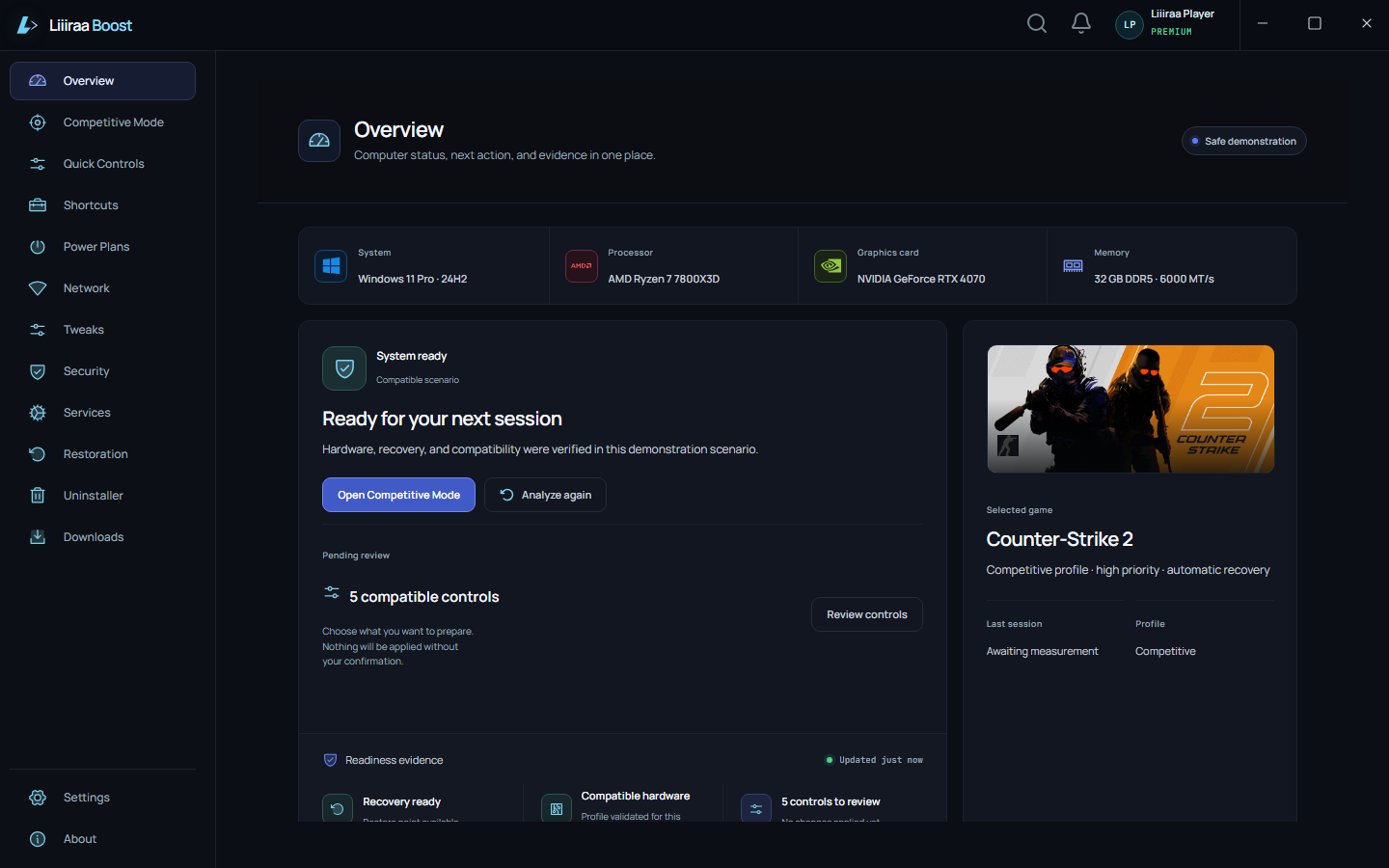
Real Liiiraa Boost desktop application Home screen in English.
Real capture details

Review the scenario, viewport, and commit for this approved capture.

MeasuredApproved capture · S01 · 1440x900 · commit 3c7ebc475638fb15b1257f35eb758274e7a85b11
View complete screenshot
NextWhy context matters

Before you optimize

Your game should not compete with everything Windows happens to be running.

Background processes, startup weight, power behavior, and generic settings can compete with the match. Liiiraa Boost identifies what deserves attention before changing anything.

How it works

Analyze. Optimize. Prove.

The app observes the machine, prepares a plan you can review, and keeps the comparison tied to the real conditions of your own session.
  1. Prepare with a plan you can review

    The app considers hardware, Windows, drivers, processes, and games before recommending any adjustment.

  2. Prove without turning a hypothesis into a result

    Before and after use the same PC and keep the game, version, conditions, and data source visible.

  3. Restore with the same rigor used to prepare

    History, consequences, and recovery remain visible on every plan.

Competitive Mode

Prepare Windows for the match — and bring everything back when it ends.

Competitive Mode calibrates preparation for your hardware and each game. It focuses the session on what matters, reduces known interference, and preserves the previous state for restoration.Compare the modes
  1. Before the match, review the calibration and proposed changes for that game.

  2. During the session, the profile focuses resources without promising a result that has not been measured.

  3. When you finish, the app restores temporary actions and keeps the history available.

Results you can inspect

Evidence starts on the same PC, in the same game, under visible conditions.

Measurements stay separate from estimates and unavailable data. Version, scenario, and collection quality travel with the comparison so you can see what was observed and what remains unproven.See real results
Inspect evidence

Measurements, estimates, and unavailable data are separated to prevent misleading conclusions.

Source
https://liiiraa.com/en/results
Scope
Source, validation, and unavailable states presented by the product
Version
1.0.0
Validation state
Validated

What remains unproven: No performance number is claimed before local analysis and benchmarking.

Free or Premium

Start with the essentials. Advance when per-game automation makes sense.

Essential Mode is free forever and keeps diagnostics, manual application, one active profile, history, and restoration. Premium adds calibration, unlimited profiles, automatic activation, and advanced comparisons.

Free · Essential Mode

US$ 0free forever

  • Real, safe basic optimizations with manual application
  • One active game profile, diagnostics, and benchmark
  • Safe process, startup, and power-plan work
  • Complete history and restoration

Premium · Competitive Mode

US$ 6.99/monthor US$ 59.99/year

  • Hardware calibration and advanced optimizations
  • Unlimited profiles and automatic per-game activation
  • Advanced comparisons and personalized assistance
  • Priority support with restoration always available
See every plan detail

Safety and restoration

Performance also means having a clear path back.

Every reviewed change leaves a record. History and restoration stay available on Free and Premium, including after a subscription ends.
Inspect evidence

You can identify what changed and start restoration without depending on an active subscription.

Source
https://liiiraa.com/en/results
Scope
Reversal explanations, history, and recovery modeled in the product
Version
1.0.0
Validation state
Validated

What remains unproven: Restoration depends on a valid recovery point and never bypasses a safety failure.

Before you install

Direct answers so you can decide with confidence.

See how Free works, where analysis happens, what can be undone, and why no result is promised before local measurement.
Is Free a trial?

No. Essential Mode is free forever, with no card, ads, or daily limits.

Does the app guarantee more FPS?

No. Liiiraa Boost measures your PC and reports only comparable results under recorded conditions.

Can I undo an adjustment?

Yes. History and restoration remain available on Free and Premium.

Where is the PC analyzed?

In the Windows desktop app. The website never performs deep machine analysis.

Free · Essential Mode

Your first result starts on your own PC.

Download the app, confirm compatibility, and start with Essential Mode. Distribution remains blocked until version, signature, integrity, and compatibility are approved.
Download and analyze my PCCheck compatibility